Lead times
Accurately forecasting delivery dates is vital for fulfilling customer expectations. In Odoo, the Inventory app allows for comprehensive lead time configuration, allowing coordination and planning of manufacturing orders, deliveries, and receipts.
Lead time types
Different lead times for different operations can impact various stages of the order fulfillment process. Here's a summary of the types of lead times in Odoo:
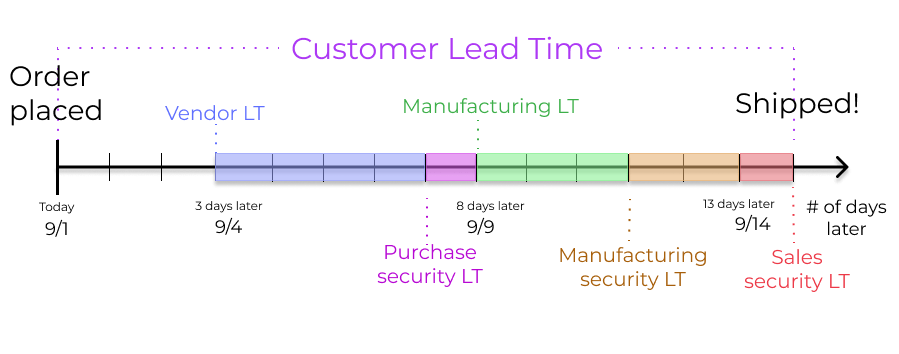
Customer lead time: default time frame for fulfilling customer orders. The customer lead time is the number of days from the date the sales order (SO) is confirmed to the date the products are shipped from the warehouse. This is also known as delivery lead time.Sales security lead time: moves the scheduled delivery date forward by a specified number of days. This serves as a buffer to allow ample time to prepare the outgoing shipment earlier, considering the possibility of delays in the fulfillment process.Purchase lead time: number of days from the confirmation of a purchase order (PO) to the receipt of products. It provides insight on the time it takes for products to arrive at the warehouse, facilitating effective scheduling and planning of supplier deliveries.Purchase security lead time: advances the order deadline on aPO (Purchase Order)by a specified number of days. This proactive approach of placing orders earlier mitigates the risk of vendor or shipping delays. Thus, for products that are set to replenish to order, the need appears on the Replenishment report earlier, according to the specified number of days.Days to Purchase: days needed for the vendor to receive a request for quotation (RFQ) and confirm it. It advances the deadline to schedule aRFQ (request for quotation)by a specified number of days.Manufacturing lead time: number of days needed to complete a manufacturing order (MO) from the date of confirmation. This lead time includes weekends (non-working hours in Odoo), and is used to forecast an approximate production date for a finished good.Days to prepare manufacturing order: number of days needed to replenish components, or manufacture sub-assemblies of the product. Either set one directly on the bill of materials (BoM), or click Compute to sum up purchase and manufacturing lead times of components in theBoM (Bill of Materials).Manufacturing security lead time: moves the scheduled date of theMO (manufacturing order)forward by a specified number of days. When used in conjunction withreplenish to order, the security lead time makes the need appear earlier on the replenishment report.
Sales lead times
Customer lead times and sales security lead times can be configured to automatically compute an expected delivery date on a SO (Sales Order). The expected delivery date ensures a realistic delivery dates setting for shipments from the warehouse.
Odoo issues a warning message if the set delivery date is earlier than the expected date, as it may not be feasible to fulfill the order by that time, which would impact other warehouse operations.
TIP
A SO (sales order) containing a [Coconut-scented candle] is confirmed on July 11th. The product has a customer lead time of 14 days, and the business uses a sales security lead time of 1 day. Based on the lead time inputs, Odoo suggests a delivery date in 15 days, on July 26th.
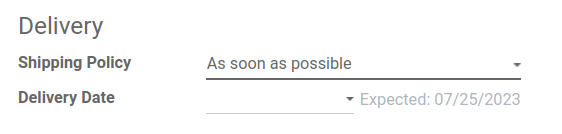
The following sections demonstrate how to automatically compute expected delivery dates.
Customer lead time
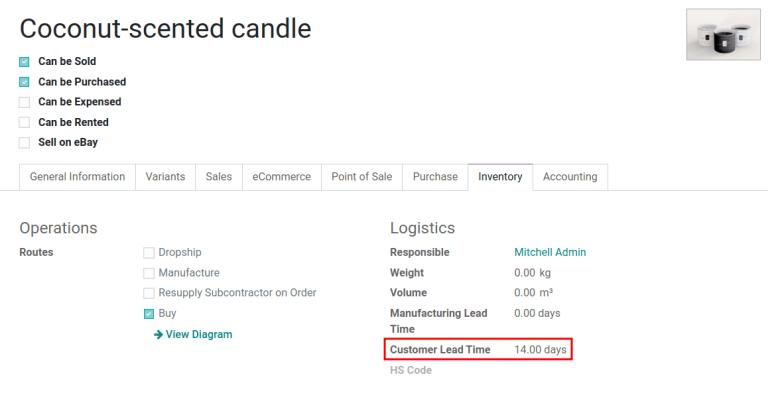
Set the customer lead time on each product form, by navigating to the products page. To do so, go to Sales app ‣ Products ‣ Products. From there, select the desired product, and switch to the Inventory tab. Then, under the Customer Lead Time field, fill in the number of calendar days required to fulfill the delivery order from start to finish.
TIP
Set a 14-day customer lead time for the [Coconut-scented candle] by navigating to its product form. Then, in the Inventory tab, type [14.00] days into the Customer Lead Time field.
Sales security lead time
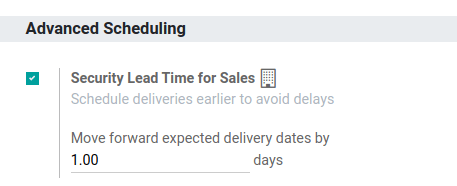
Sales security lead time is set globally for the business in Inventory app ‣ Configuration ‣ Settings.
On the configuration page, under the Advanced Scheduling heading, locate the box for Security Lead Time for Sales, and click the checkbox to enable the feature.
Next, enter the desired number of calendar days. This security lead time is a buffer notifying the team to prepare for outgoing shipments earlier than the scheduled date.
TIP
Setting the Security Lead Time for Sales to [1.00] day, pushes the Scheduled Date of a delivery order (DO) forward by one day. In that case, if a product is initially scheduled for delivery on April 6th, but with a one-day security lead time, the new scheduled date for the delivery order would be April 5th.
Deliver several products
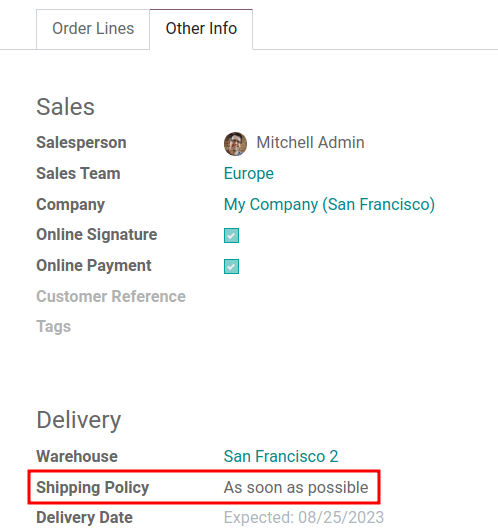
For orders that include multiple products with different lead times, the lead times can be configured directly from the quotation itself. On a quotation, click the Other Info tab, and set the Shipping Policy to:
As soon as possibleto deliver products as soon as they are ready. TheScheduled Dateof theDO (Delivery Order)is determined by adding today's date to the shortest lead time among the products in the order.When all products are readyto wait to fulfill the entire order at once. TheScheduled Dateof theDO (Delivery Order)is determined by adding today's date to the longest lead time among the products in the order.
TIP
In a quotation containing 2 products, [Yoga mat] and [Resistance band,] the products have a lead time of 8 days and 5 days, respectively. Today's date is April 2nd.
When the Shipping Policy is set to As soon as possible, the scheduled delivery date is 5 days from today: April 7th. On the other hand, selecting When all products are ready configures the scheduled date to be 8 days from today: April 10th.
Purchase lead times
Automatically scheduling supplier orders streamlines procurement by showing users exactly when to confirm a request for quotation (RFQ) and when to expect the goods.
Field Description
Order Deadline Last calendar day to confirm the RFQ (request for quotation) and convert it to a PO (purchase order) Expected Arrival Arrival date of the products. Calculated by Order Deadline + Vendor Lead Time
: Key dates on an RFQ / PO
In addition, Odoo has global security lead times, which are buffers that widen the just-in-time (JIT) forecast window. The security lead times affect only replenishment methods that use pull rules ---for example reordering rules or make to order (MTO) . They do not change the interval between Order Deadline and Expected Arrival.
Buffer Purpose Impact on dates
Purchase Security Lead Time Extra calendar days to account for delays. Typically used to account for weekends or holidays. None on the RFQ (request for quotation)/PO (purchase order); adds buffer days in the JIT forecast window . Days to Purchase Days the vendor needs to review an RFQ (request for quotation) after it is sent. None on the RFQ (request for quotation)/PO (purchase order); adds buffer days in the JIT forecast window .
: Global security lead time buffers
TIP
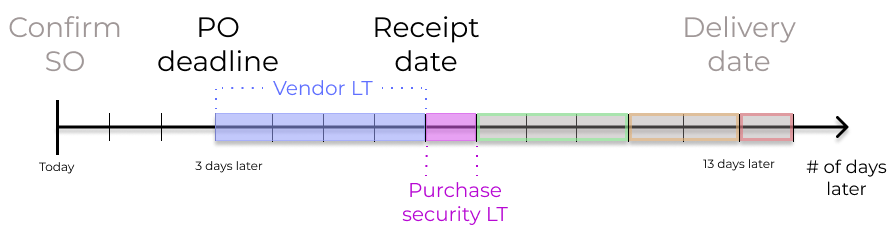
To tie all the purchase lead times together, consider this:
- Today: April 21
Vendor Lead Time: 1 dayPurchase Security Lead Time: 4 daysDays to Purchase: 2 days
Days from today = 1 + 4 + 2 = 7
Forecasted date = April 28
Example of the JIT (just-in-time) forecast window, which is April 21-28.
If an RFQ (request for quotation) is created today, the following fields show:
Order Deadline: April 23 ($\text + 2$)Expected Arrival: April 24 ($\text + 1$)

Vendor lead time
To set a vendor lead time for orders arriving in the warehouse from a vendor location, begin by navigating to a product form through Purchase app ‣ Products ‣ Products.
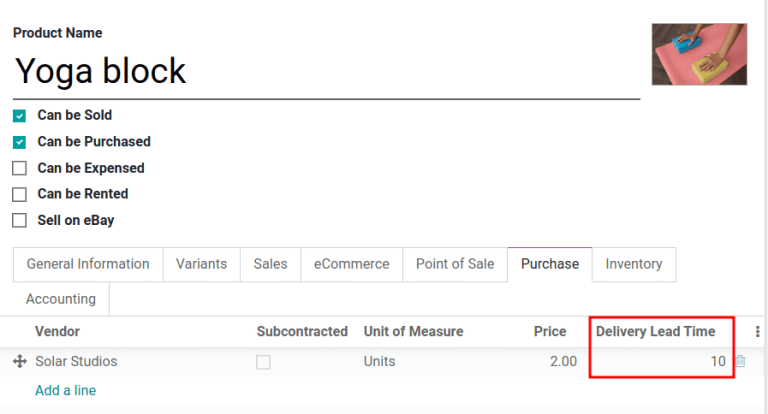
Next, select the desired product, and switch to the Purchase tab. In the editable vendor pricelist, click the Add a line button to add vendor details, such as the Vendor name, Price offered for the product, and lastly, the Delivery Lead Time.
TIP
Multiple vendors and lead times can be added to the vendor pricelist. The default vendor and lead time selected is the entry at the top of the list.
TIP
A PO (purchase order) is marked late if the Expected Arrival date has passed, and appears in the Late box on the Purchase app's dashboard.
TIP
On the vendor pricelist of the product form, the Delivery Lead Time for the selected vendor is set to [10 days.]
Purchase security lead time
Purchase security lead time is a global buffer to account for delays, applied to all vendors. To set it, go to Inventory app ‣ Configuration ‣ Settings.
Under Advanced Scheduling, tick the Security Lead Time for Purchase checkbox.
Next, enter the desired number of calendar days. By configuring the security lead time, a buffer is set to account for potential delays in supplier deliveries. Then, click Save.
Days to purchase lead time
To set it up, go to Inventory app ‣ Configuration ‣ Settings. Under the Advanced Scheduling section, in the Days to Purchase field, specify the number of days required for the vendor to confirm a RFQ (request for quotation) after receiving it from the company.
Manufacturing lead times
Lead times can help simplify the procurement process for consumable materials and components used in manufactured products with bills of materials (BoMs).
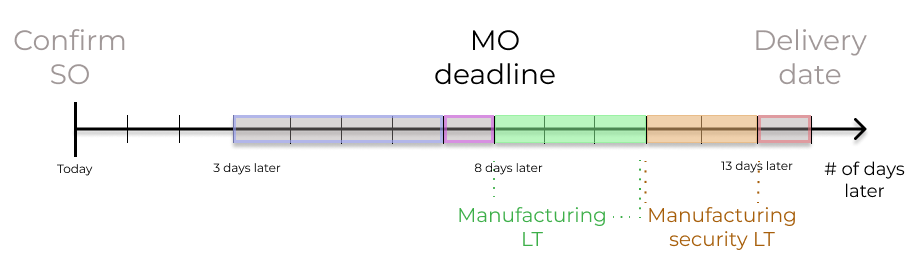
The MO (manufacturing order) deadline, which is the deadline to begin the manufacturing process to complete the product by the scheduled delivery date, can be determined by configuring the manufacturing lead times and manufacturing security lead times.
Manufacturing lead time
Manufacturing lead times for products are configured from a product's bill of materials (BoM) form.
To add a lead time to a BoM (Bill of Materials), navigate to Manufacturing app ‣ Products ‣ Bills of Materials, and select the desired BoM (Bill of Materials) to edit.
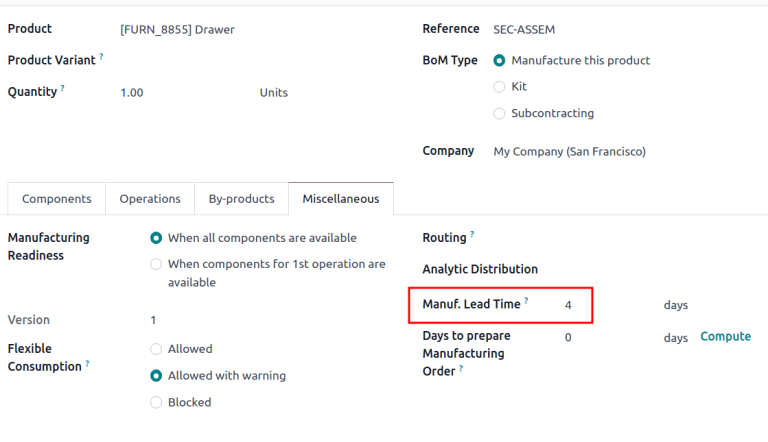
On the BoM (Bill of Materials) form, click the Miscellaneous tab. Change the value (in days) in the Manuf. Lead Time field to specify the calendar days needed to manufacture the product.
TIP
If the selected BoM (Bill of Materials) is a multi-level BoM (Bill of Materials), the manufacturing lead times of the components are added.
If the BoM (Bill of Materials) product is subcontracted, the Manuf. Lead Time can be used to determine the date at which components should be sent to the subcontractor.
Establish a MO (manufacturing order) deadline, based on the expected delivery date, indicated in the Scheduled Date field of the DO (Delivery Order).
The MO (manufacturing order) deadline, which is the Scheduled Date field on the MO (manufacturing order), is calculated as the expected delivery date subtracted by the manufacturing lead time.
This ensures the manufacturing process begins on time, in order to meet the delivery date.
However, it is important to note that lead times are based on calendar days. Lead times do not consider weekends, holidays, or work center capacity (the number of operations that can be performed at the work center simultaneously).
TIP
A product's scheduled shipment date on the DO (Delivery Order) is August 15th. The product requires 14 days to manufacture. So, the latest date to start the MO (Manufacturing Order) to meet the commitment date is August 1st.
Days to prepare manufacturing order
Configure the days required to gather components to manufacture a product by going to its BoM (Bill of Materials). To do that, go to Manufacturing app ‣ Products ‣ Bills of Materials, and select the desired BoM (Bill of Materials).
In the Miscellaneous tab of the BoM (Bill of Materials), specify the calendar days needed to obtain components of the product in the Days to prepare Manufacturing Order field. Doing so creates MOs (manufacturing orders) in advance, and ensures there is enough time to either replenish components, or manufacture semi-finished products.
TIP
Clicking Compute, located next to the Days to prepare Manufacturing Order field, calculates the longest lead time among all the components listed on the BoM (Bill of Materials).
Purchase security lead times that impact this specific BoM (Bill of Materials) are also added to this value.
TIP
A BoM (Bill of Materials) has two components, one has a manufacturing lead time of two days, and the other has a purchase lead time of four days. The Days to prepare Manufacturing Order is four days.
Manufacturing security lead time
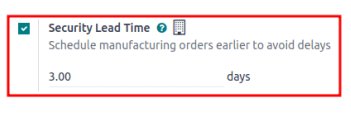
Manufacturing security lead time is set globally for the business in Manufacturing app ‣ Configuration ‣ Settings. Under the Planning heading, tick the checkbox for Security Lead Time.
Next, enter the desired number of calendar days. By configuring the security lead time, a buffer is set to account for potential delays in the manufacturing process. Then, click Save.
TIP
A product has a scheduled shipment date on the DO (Delivery Order) set for August 15th. The manufacturing lead time is 7 days, and manufacturing security lead time is 3 days. So, the Scheduled Date on the MO (manufacturing order) reflects the latest date to begin the manufacturing order. In this example, the planned date on the MO (manufacturing order) is August 5th.
Global example
See the following example to understand how all the lead times work together to ensure timely order fulfillment:
- Sales security lead time: 1 day
- Manufacturing security lead time: 2 days
- Manufacturing lead time: 3 days
- Purchase security lead time: 1 day
- Vendor lead time: 4 days
The customer places an order for a manufactured product on September 1st, and the scheduled delivery date from the warehouse is on September 20th. Odoo uses lead times and automated reordering rules to schedule the necessary operations, based on the outgoing shipment delivery date, September 20th:
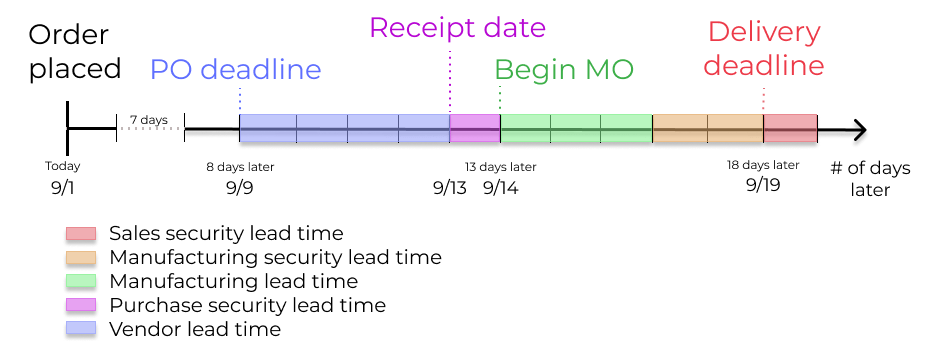
- September 1st: Sales order created, confirmed by salesperson.
- September 9th: Deadline to order components to ensure they arrive in time when manufacturing begins (4-day supplier lead time).
- September 13th: Scheduled date of receipt for components. Initially, it was set to 9/14, but the 1-day purchase security lead time pushed the date earlier by 1 day.
- September 14th: Deadline to begin manufacturing. Calculated by subtracting the manufacturing lead time of 3 days, and the manufacturing security lead time of 2 days, from the expected delivery date of September 19th.
- September 19th:
Scheduled Dateon the delivery order form indicates the updated expected delivery date, which was originally set as September 20th. But the sales security lead time pushed the date forward by a day.
Odoo's replenishment planning maps a business' order fulfillment process, setting pre-determined deadlines and raw material order dates, including buffer days for potential delays. This ensures products are delivered on time.